 TillYouDo
The TillYouDo guide
Follow-up reminders, at a pace you choose
A repeating schedule sets when a new task is due. A follow-up plan is what happens when the current one is still unfinished.
Updated 27 September 2026 · iPhone · iOS 26+
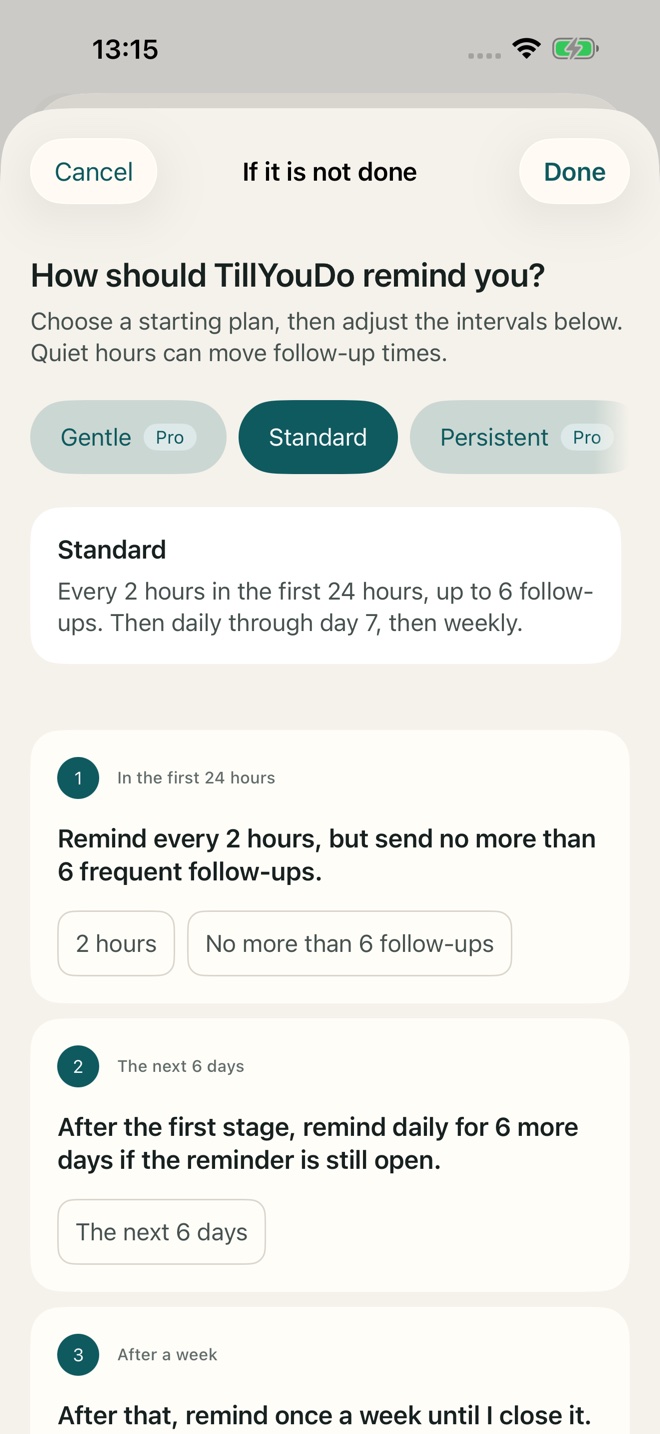
Find the setting
While creating or editing a reminder, open If unfinished. Your changes are a draft until you apply the plan and save the reminder. For Adaptive, Adjust the stages opens the more detailed plan.
Adaptive: closer first, quieter later
The standard plan allows up to six follow-ups in the first 24 hours, then one per day through day seven, then one per week while the reminder remains open. The selected intervals, quiet hours and iOS delivery conditions affect the actual times. Standard adaptive follow-ups are included in Free.
Fixed: your chosen interval
Choose Fixed when you want a steady interval for an unfinished reminder. Enter the amount and unit shown in the editor. Fixed cadence and a custom first follow-up interval require Pro for new use. Later-stage adjustments are not all paid features; the app identifies the particular choices that need Pro.
Single: one notification, still your decision
Single sends one system notification. It does not automatically complete, archive or hide the reminder afterwards. The item stays active until you explicitly act. This mode is included in Free.
Snooze is not a restart
Snoozing moves the next delivery. It does not erase the original due time or restart the intensive phase of Adaptive. If you need a genuinely different long-term plan, edit the reminder rather than repeatedly snoozing it.