 TillYouDo
The TillYouDo guide
A reminder that stays until you close it
The first notification is a beginning. You decide when the reminder is finished.
Updated 27 September 2026 · iPhone · iOS 26+
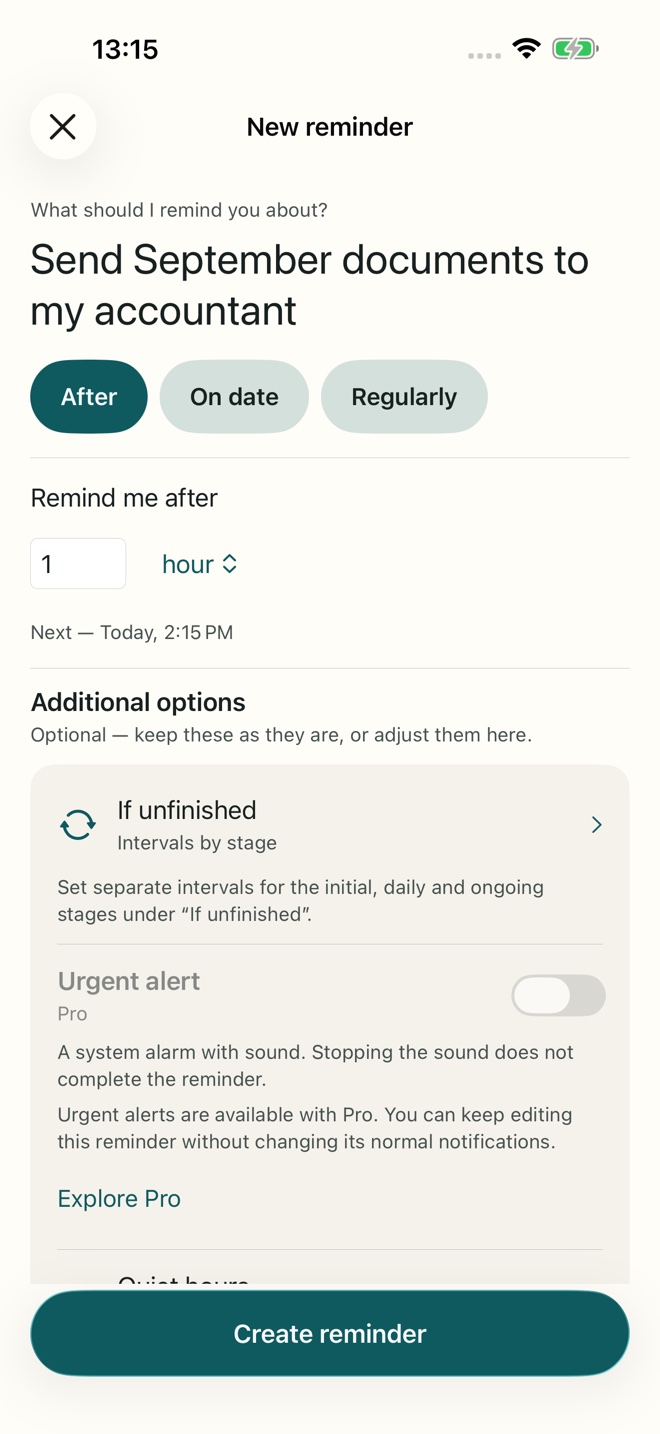
Start with the whole thought
“Send the signed contract to Morgan” is more useful than “Documents”. Put the action and the person in the title. Add a note when you need extra context. You can use the dictation button on the iPhone keyboard; TillYouDo does not record your voice.
Choose the first moment
Tap the plus button in Reminders or Archive. Choose a delay, a date and time, or a regular schedule. A one-minute delay is valid. Review the time shown before saving: it should be the moment you actually want the first reminder.
Decide what happens if you are busy
In the creation screen, open If unfinished. Adaptive gradually spaces follow-ups further apart. Single sends one notification but keeps the reminder active. Fixed repeats at your chosen interval and is part of Pro. Quiet hours let ordinary follow-ups respect your rest.
Save, then allow notifications
The reminder is saved before TillYouDo asks for notification permission. Allow notifications if you want system alerts. If you decline, the reminder stays in the app, but system delivery needs that permission. You can change it later in iPhone Settings.
Close the loop
Done explicitly completes the open occurrence. Snooze changes the next notification time. Archive saves the reminder and its settings for later reuse. Dismissing a notification—or stopping an urgent sound—does none of these. A recurring reminder keeps only one open occurrence at a time.